Bot & fraud detection without the tag.
Edge reads the Cloudflare Logpush data your storefront already produces and runs more than twenty purpose-built detectors against it. Credential stuffing, scalper bots, scrapers and fake crawlers: detected in minutes, explained in plain English, and paired with the exact rule to stop them, ready for your approval. No JavaScript tag, nothing between your customer and checkout.
Deployed with a Logpush job, not a code change · how that beats a tag · see the live demo · first 10 customers: Starter for £19/month
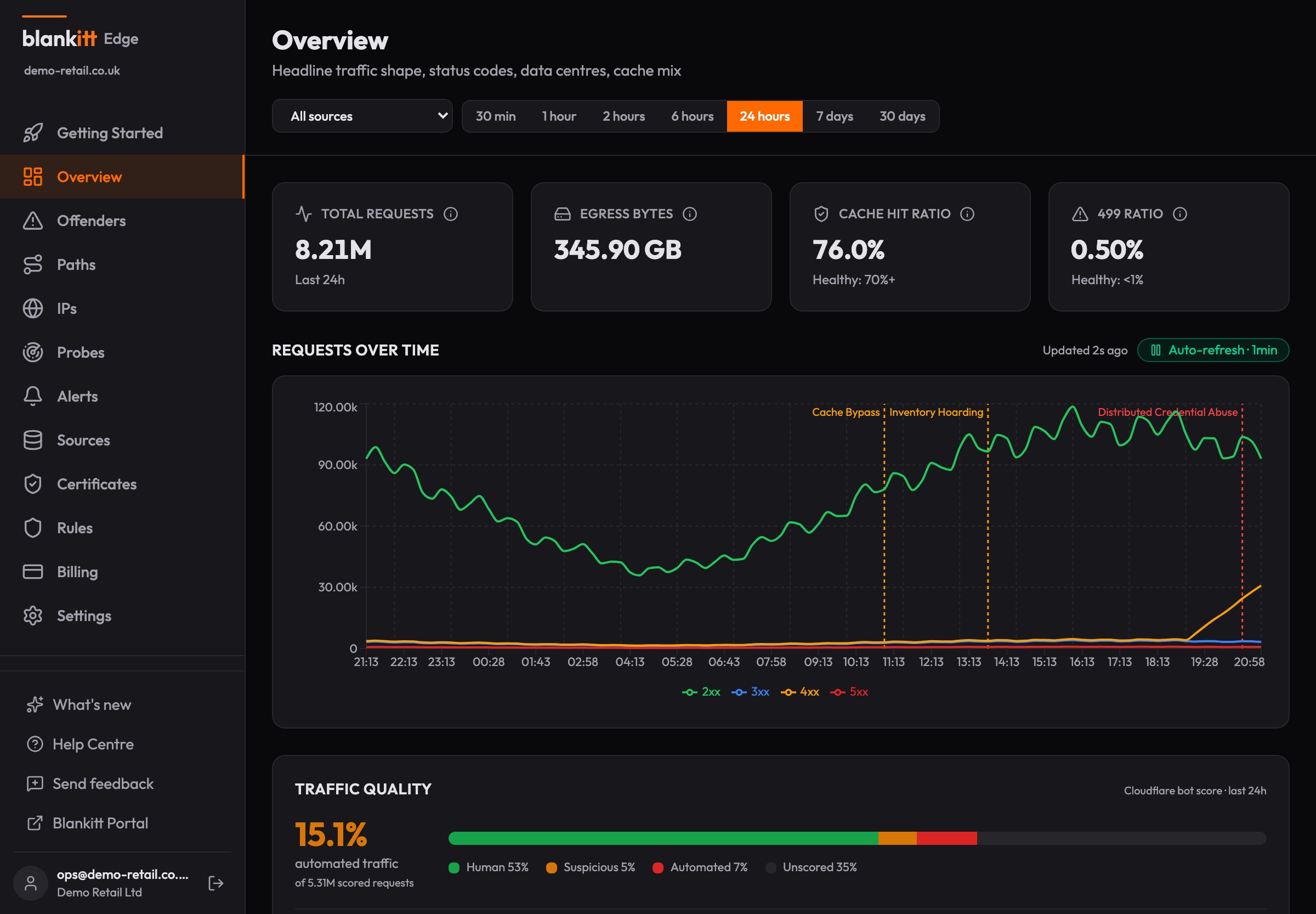
£99/mo
Starter. Pricing on the page, no sales calls
20+ detectors
all included on every plan, thresholds tunable
< 2 minutes
from anomalous traffic to an alert
0 lines
of storefront code. A Logpush job, not a tag
The eCDN blind spot
Salesforce B2C Commerce ships traffic behind a Cloudflare-powered eCDN. But as an SFCC merchant, you cannot access the Cloudflare console, Bot Management, or WAF analytics. The eCDN exposes raw logs via the CDN Zones API but provides no anomaly detection, no alerting, and no visibility into who is hitting your origin.
You are blind until performance degrades, or until the finance team asks why chargebacks doubled. Edge fills that gap: it ingests your Logpush data and runs more than twenty purpose-built detectors against it continuously. And because it reads logs rather than injecting a tag, it sees every request, including the API scrapers, vulnerability probes and fake crawlers that never execute JavaScript.
Real incident. Real blind spot.
Detected through manual log analysis, not by the eCDN.
A coordinated scraping operation from a single Vietnamese ISP (ASN 45899) ran undetected for two months against a Salesforce B2C Commerce storefront. The attacker used distributed IPs, deliberately rotated user agents, and a shared URL queue to systematically catalogue products across four regional sites.
Over that period, the ASN generated 34 million requests. 16.5 million received successful responses before mitigations were applied. Almost all traffic bypassed the cache and hit the origin directly, causing 503 and 521 errors. When challenged, the attacker upgraded their tooling and escalated to 8.1 million requests in 12 hours. None of this was detected by the eCDN's built-in protections.
20+ detectors, grouped by what they cost you
Continuous analysis of every request in your eCDN traffic, not just the ones that run JavaScript. Organised around the attacks a retailer actually pays for.
Account takeover & credential abuse
Distributed login attacks end in drained gift cards, stored-card fraud and chargebacks. These detectors watch the credential paths from every angle.
Distributed credential stuffing
Aggregates POST pressure on login, password-reset and gift-card paths across every network at once. It catches the attack that splits itself across 20+ networks to stay under each per-network radar.
IP fan-out
Many source IPs converging on a single path in one window: the shape of a coordinated distributed attack where every individual IP stays politely under the limits.
Method shift
A network that flips from browsing (GET) to posting (POST) with failures climbing: the signature of credential testing and form abuse.
Challenge solving
Post-mitigation evasion: attackers upgrading tooling to solve WAF challenges after being blocked. Compares solve rates across time windows to catch the upgrade.
Scalping & inventory abuse
Limited drops attract bots that buy before your customers can. Scalpers succeed: their traffic is clean 2xx, so failure-based tools never see them.
Inventory hoarding velocity
Per-network add-to-cart velocity, weighted by Cloudflare bot scores. Trips on the successful, 2xx-dominant cart abuse that error-based detection is structurally blind to.
Checkout path spike
One controller suddenly taking multiples of its baseline traffic: card testing on checkout submit, voucher brute force, flash-sale abuse.
Scraping & catalogue harvesting
Your prices, stock and content, taken at your origin’s expense. Nine detectors cover the fast, the slow, the distributed and the disguised.
ASN traffic spike
Compares each network’s 5-minute request volume against its own prior baseline. Fires when a single network suddenly sends multiples more traffic than normal: the hallmark of a coordinated scrape.
Cache bypass
Catches networks whose cache-miss ratio deviates dramatically from your site’s healthy baseline. A high miss rate means requests are hitting your origin directly: an origin-cost attack that inflates bandwidth bills without triggering CDN alerts.
Abnormal 499 rate
A 499 means the client closed the connection before your server finished responding. Legitimate browsers almost never do this. Scrapers do it constantly. It is the single most reliable scraper signature.
Path entropy
Catches systematic catalogue crawling by measuring how evenly a network distributes requests across URL paths. Legitimate users hit popular pages heavily; catalogue walkers hit every path evenly.
Slow-burn escalation
Catches gradual week-over-week escalation that no fast detector fires on. Compares 7-day vs 28-day baselines per network and country, and trips when traffic rises, 499 ratios climb, or cache-hit rates silently drop.
Browser version churn
One network cycling through dozens of browser versions in minutes. Real visitor populations cluster on two or three current releases; rotation harnesses spread across thirty.
Bot score
Leverages Cloudflare Bot Management scores exposed via the eCDN. Flags networks where 50%+ of scored traffic is automated. It catches bots that rotate IPs, user-agents, and fingerprints.
Search abuse
Bot-scored flooding on the search and suggestion endpoints, measured against each network’s own baseline. Cloudflare-verified crawlers are excluded first, so Googlebot can never trip it.
Stale browser fleet
Networks running browser versions five or more majors behind your real visitor population: the fingerprint of automation frameworks pinned to old engines.
Probing & reconnaissance
The attack before the attack, the impostors, and the adversaries who come back for another try.
Fake crawlers
Traffic claiming to be Googlebot or another known crawler without Cloudflare’s verified-bot tag: the standard scraper trick for slipping through WAF allowlists. The tag never sees these clients; the logs always do.
AI agent traffic
Declared AI agents and LLM crawlers (GPTBot, ClaudeBot, PerplexityBot) identified by name, with transaction-path attempts surfaced separately in the Bots & agents view.
Probe & scanner detection
Flags reconnaissance before the attack: 404 probes for WordPress paths, exposed .env and .git files, SQL dumps, and admin panels. Probes that target your brand name specifically fire a critical alert on the very first hit.
Repeat offenders
Networks that return across days earn escalating severity. Edge remembers the adversaries that regroup and retry.
Availability, integrity & compliance
The operational signals that tell you something is being ground down, or quietly misconfigured.
Origin latency spike
Origin response time deviating from its own baseline: the earliest sign your origin is being ground down by traffic the cache isn’t absorbing.
TLS weak protocol
Detects traffic using deprecated TLS 1.0/1.1 or no encryption. Surfaces misconfigured scrapers, legacy integrations, and PCI DSS 4.0 compliance risk.
Certificate expiry
Monitors SSL/TLS certificates for your domains. Probes daily and alerts at configurable thresholds (30, 14, 7, 1 days) before expiry. Detects certificate changes and issuer switches.
Telemetry silence
If your Logpush goes quiet, that’s an alert too. A dead pipeline never gets to masquerade as a clean bill of health.
From anomaly to evidence
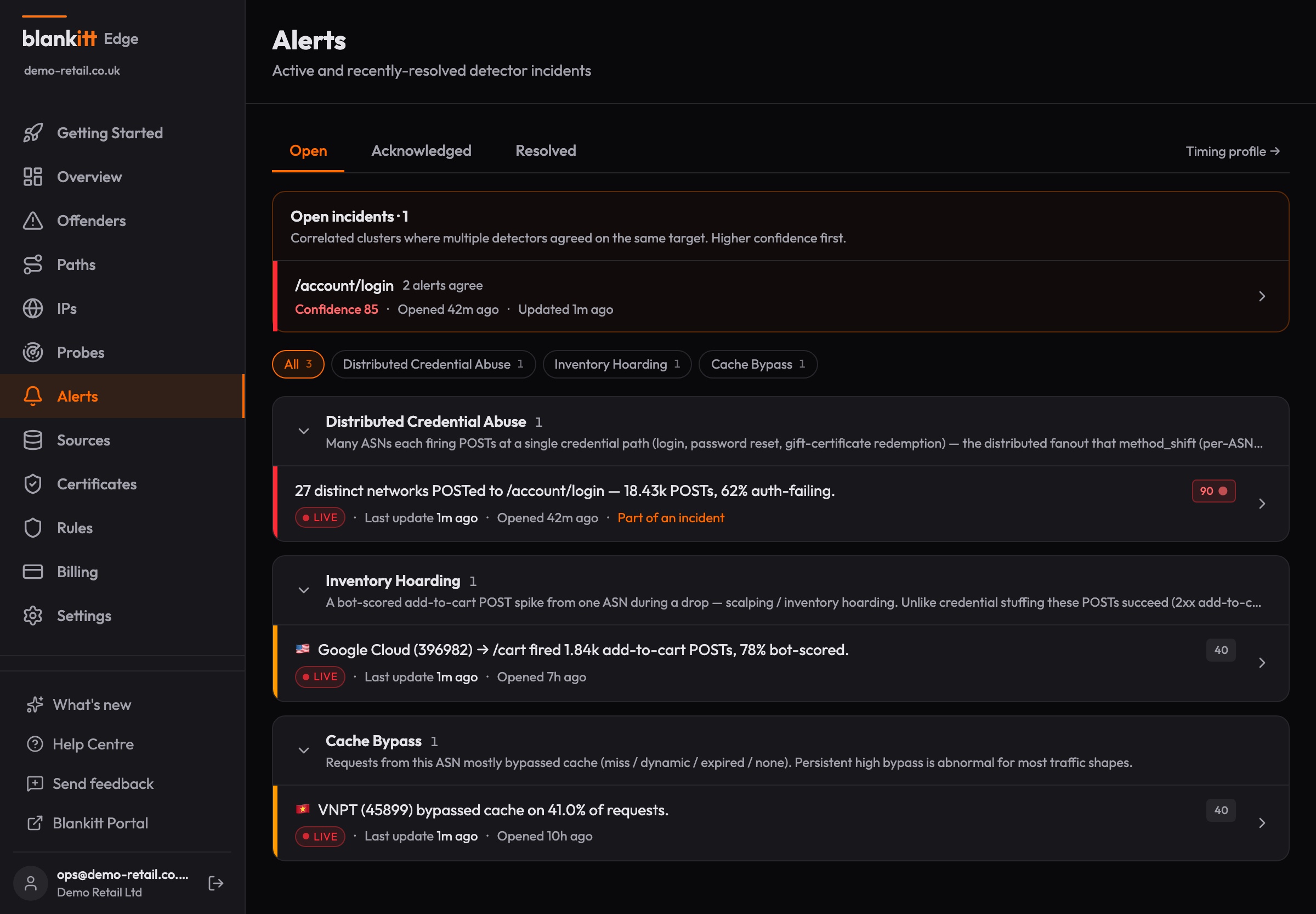
Alerts that carry their own proof.
A detection you can't explain is a detection you can't act on. Every Edge alert states what fired, on which network and path, against what baseline, and what to do about it.
- Incidents escalate only when two or more independent detector kinds agree on the same target, so the 3am page is one worth waking for.
- Every alert ships a playbook and the exact eCDN rule to stop the attack: the expression, the ready-to-paste API call, and the Business Manager steps, challenge-first.
- On Growth and Enterprise, apply that rule to your eCDN in one click and roll it back in one, with every action recorded in an immutable audit ledger.
- Raw NDJSON forensics on every plan: query by network, path, status or user-agent to build the evidence.
- Dismiss with a reason (false positive, accepted risk, mitigated) so noise you’ve triaged stays triaged.
- Declare campaign and drop windows: expected surges hold the volume alarms, and every window reports its automated share afterwards.
What happened, in plain EnglishAI summary
A critical alert is open for your storefront. AS45899, a Vietnamese ISP, escalated to 8.1 million requests in 12 hours against your product pages, with almost all of that traffic bypassing the cache and hitting your origin directly. This shape is consistent with a coordinated scraping operation rather than real shoppers.
Edge has drafted a challenge rule scoped to this network for your review. The decision is yours.
Example brief for the incident documented above. Facts and rules come from the deterministic pipeline, not the AI, and nothing is applied without your approval.
From evidence to English
Alerts your whole team can read.
Most security tools hand you a score and leave the interpretation to you. Edge writes the story from the alert's own evidence: who is behind the traffic, what kind of network it came from, how it compares to your baseline, and whether they have been seen before.
- Every alert carries a plain-English brief an ecommerce manager can forward, no security background needed.
- Every drafted rule carries a note on exactly what it would and would not block, before you decide to apply it.
- Your week arrives as a story over the banked numbers, aware of the promo weeks you tagged, not a dashboard to decode.
- The AI only ever explains. Detection comes from the detectors, rules come from the deterministic pipeline, and nothing is applied without your approval.
The truth layer under the tools you already run
Edge doesn't replace your analytics, search or personalisation stack. It sits underneath at the request layer, sees what they can't, and keeps the data feeding them honest.
Adobe Analytics & tag analytics
Tags measure consenting browsers; the eCDN logs every request. Edge quantifies the gap, shows the automated share, and exports confirmed offenders as Adobe bot rules in one click.
Why the numbers differBloomreach & site search
Search ranking and personalisation learn from queries and clicks. Scrapers inject junk into exactly those signals. Edge catches them at the CDN, before they reach the systems that learn.
How the poisoning worksYour eCDN WAF
Enforcement stays in the WAF you already own. Every alert carries the exact rule to apply, challenge-first, one click to apply and one to roll back. Nothing happens to your storefront that you didn't decide.
Why that beats a tagHow it works
No JavaScript injection. No client-side scripts. No impact on page performance.
Connect Logpush
Create a source in Edge and configure eCDN Logpush via the CDN Zones API to point at your ingest URL. Bearer token authentication ensures only your logs are accepted. Setup takes minutes.
Detectors analyse
More than twenty detectors run continuously on per-minute aggregated data. Credential stuffing, scalper velocity, scraper signatures, cache bypass, reconnaissance probes, and slow-burn escalation are all caught automatically.
Alerts fire
When a detector trips, Edge sends email, Microsoft Teams, Slack and webhook notifications within two minutes. Acknowledge, investigate with raw forensic data, and resolve, all from the dashboard.
Cloud or on-premises
Same dashboards, same detectors. Choose where your data lives.
Cloud
Point your Logpush at our ingest URL. We handle the infrastructure, rollups, and storage. Dashboards available immediately via Portal SSO.
On-premises
Run a Rust container locally. Logs are processed on your network. Only rolled-up aggregates ship to the portal. Raw data never leaves your infrastructure. Available on the Enterprise plan.
Why Edge?
Enterprise bot management costs £30k–£200k+/yr, needs a JavaScript tag on every page, and only sees the clients that run it. DIY monitoring means months of engineering. Edge gives you retail-specific detection from £99/month.
| Enterprise | DIY | Edge | |
|---|---|---|---|
| Price | £30k–£200k+/yr | £2k–£10k/mo + eng | From £99/mo |
| Time to value | 3–6 months | 2–4 months | Minutes |
| JS tag on your storefront | Required | Not needed | Not needed |
| Sees non-JS traffic (API scrapers, probes, fake crawlers) | No (tag-blind) | Yes | Yes |
| SFCC-specific detection | No | No | Yes |
| On-premise | No | Self-hosted only | Yes |
| Slow-burn detection | No | Build it yourself | Built-in |
One incident pays for years of Edge.
A two-month scraping operation sent 34 million requests, almost all bypassing cache and hitting origin directly. The resulting bandwidth costs and 503 errors dwarfed the cost of detection. Edge would have caught it within minutes of the first anomalous batch.
Transparent pricing
No sales calls. No hidden fees. No traffic metering. Every detector included on every plan, with a 30-day free trial.
Founding offer: the first 10 customers get Starter for £19/month for their first year. Code FOUNDING19 at checkout.
Starter
/month
Growth
/month
Enterprise
/month
Go deeper
The receipts behind the positioning: dated, sourced, concessions included.
Walk through a real-shaped incident
A replayed catalogue-scraping incident on a fictional storefront, in the real product: three detectors correlating on one network, the plain-English brief, and the drafted rule waiting for a decision. Synthetic data throughout.
Seven ways storefronts get hurt
Fake Googlebots, card testing, Black Friday surges, catalogue scrapers, polluted analytics, reconnaissance and silent outages: the full story of each, with proof you can verify in your own logs.
Blankitt Edge vs CHEQ
A tag that runs 2,000+ challenges in the browser, or a reader of the logs that record every request, including the traffic that never runs JavaScript. The fair version of the choice, with CHEQ's wins included.
What's new across Blankitt
Dated public release notes for every product: what shipped, when. The changelog is the proof behind every claim on this page.
Why Adobe Analytics and your CDN numbers don't match
The tag sees consenting browsers. The CDN sees everything. What lives in the gap, and how to quantify it on SFCC.
Bots poison search & personalisation data
Trending queries no human typed, click-through votes from crawlers, and segments full of ghosts. The failure modes and the fix.
Frequently asked questions
Does Blankitt Edge require JavaScript injection?
No. Edge works purely from Cloudflare Logpush data. There are no JS tags, no client-side scripts, and no impact on page load performance. Tag-based bot tools also only ever see clients that execute JavaScript. API scrapers, raw-HTML harvesters, vulnerability probes and fake crawlers never run the tag. Edge reads the eCDN logs, which record every request.
Can Edge block attacks automatically?
Edge never runs a vendor policy on your storefront: that is a design guarantee, not a limitation. Every alert carries the exact eCDN rule to stop the attack (the firewall or rate-limit expression, a ready-to-paste CDN Zones API call, and the Business Manager steps), challenge-first so real shoppers pass. You approve every change, and on Growth and Enterprise you apply the rule to your eCDN in one click and roll it back in one, with every action recorded in an audit ledger. Customer-authored automation is on the roadmap: standing orders you write and approve once, challenge-only, capped and reversible. Either way the principle holds: nothing happens to your storefront that you didn’t decide. And because Edge never sits inline between your customer and checkout, detection can never cost you a sale.
What does the AI in Edge actually do?
Edge uses AI for explanation, never for enforcement. It writes the plain-English brief on every alert, a note on exactly what a drafted rule would and would not block, and your weekly traffic story. Detection comes from more than twenty deterministic detectors, rules are drafted by a deterministic pipeline, and nothing is applied without a human approving it. The AI writes only from the alert’s own evidence, its output is display-only, and Edge works fully with it switched off.
How is Edge different from tag-based tools like CHEQ or DataDome?
Tag-based tools run JavaScript challenges in the visitor’s browser, which means deploying and maintaining a tag across your storefront, and only ever seeing clients that execute JavaScript. Edge reads the same Cloudflare-powered eCDN data server-side, so it sees 100% of requests, deploys without touching storefront code, and adds zero page weight. We wrote up the full comparison, receipts included.
Does Edge replace Adobe Analytics or Bloomreach?
No. Adobe Analytics measures customer behaviour and Bloomreach powers search and personalisation; Edge sits underneath both at the request layer. It shows the traffic they never see, quantifies the automated share, and stops the abusive part at your eCDN, which keeps the data feeding those tools honest. We wrote up the detail: why Adobe and CDN numbers differ, and how bots poison search and personalisation signals.
Can I run Blankitt Edge on-premises?
Yes. Edge offers both a cloud-hosted option and an on-premises Rust container. With on-prem, raw logs are processed on your network. Only rolled-up aggregates ship to the dashboard. Raw request data never leaves your infrastructure.
How quickly does Blankitt Edge detect threats?
Detectors run on a per-minute cron cycle. When an anomaly is detected, alerts fire within two minutes via email, Microsoft Teams, Slack and webhook notifications. You can acknowledge and resolve alerts directly from the dashboard.
How long does setup take?
Most merchants see their first dashboard within minutes. Create a source in Edge, configure eCDN Logpush via the CDN Zones API to point at your ingest URL, and detectors start analysing as soon as the first batch arrives.
What data does Edge store?
Edge stores rolled-up traffic aggregates (1-minute buckets) for dashboards and alerting. Raw NDJSON batches are archived for forensic investigation. Retention depends on your plan (7, 30, or 90 days). With on-prem deployment, raw data never leaves your network.
Can I tune the detector thresholds?
Yes. Every detector has configurable thresholds: multiplier, minimum request count, and evaluation window. Defaults work well for most storefronts, but you can adjust them on the Rules page to match your traffic profile.
How much does Blankitt Edge cost?
Blankitt Edge starts from £99/month for the Starter plan. Growth is £199/month with 30-day raw retention and webhook alerts. Enterprise is £499/month with 90-day retention and on-premise deployment. Every plan starts with a 30-day free trial, and a founding-customer offer gives the first 10 customers Starter for £19/month for their first year.
Find out what's really hitting your storefront.
Connect your Logpush and see your first dashboard in minutes. No tag, no code change, no sales call.
Start 30-day free trial